Kelune CRM Self-hosted · WordPress plugin, hosted by you
A complete CRM inside your WordPress admin.
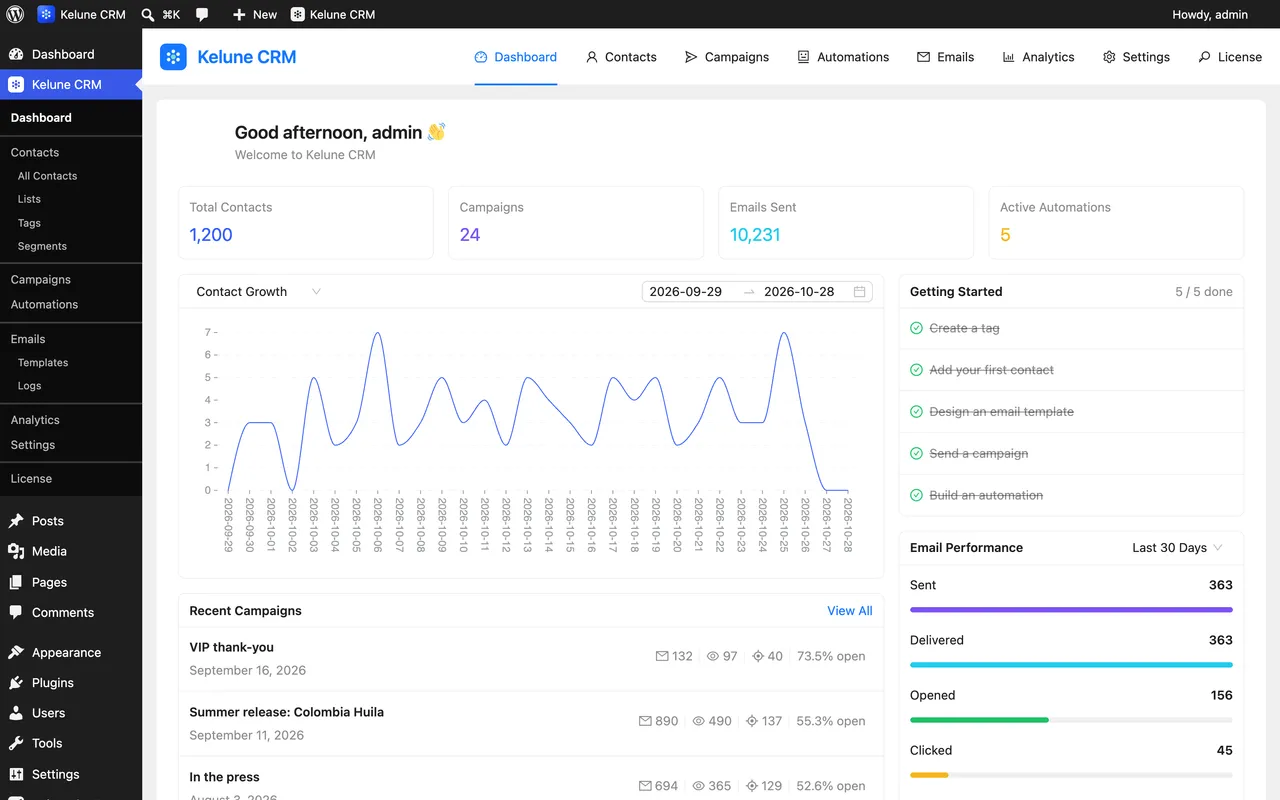
Contacts, an email builder, campaigns and automation, installed as a plugin on your own site. Your list stays in your own database, and the price never depends on how many people are on it.
- Contact limit
- None
- Monthly fee
- None
- Data lives in
- Your database
Delivers through
- SMTP
- Amazon SES
- Mailgun
- SendGrid
- WordPress mailer
Why bother
A mailing list is an asset. It should behave like one.
Hosted marketing tools charge by the size of the list they hold for you, and the bill arrives whether you sent anything that month or not. Kelune CRM keeps the same records in the database you already back up, and charges for the software instead.
See everything it does- Cost
- A license, not a subscription per head.Adding ten thousand contacts changes your hosting bill, not your Kelune CRM bill.
- Custody
- The records sit in your own tables.Query them with SQL, export them to CSV, keep them in your existing backups. Deleting the plugin leaves the data alone.
- Context
- One admin, not another tab.Users, comments and signups become contacts without a connector in between.
- Sending
- Your reputation, your provider.Mail goes out through your own SMTP or API account, on your own domain.
What you get
Six things it does, all of them on day one.
Contacts
A record for every person
Timeline, notes, tags, lists and custom fields on one screen. Import from CSV or Excel, sync from WordPress users, or collect them at signup.
Email builder
Blocks, or your own HTML
Drag text, images, buttons, columns and dividers into place, or drop a raw HTML block in among them. CSS is inlined before it sends.
Campaigns
A queue that finishes the job
Schedule a send, then let batched delivery work through it. Pause and resume mid-send. Opens, clicks and per-link results land on the same screen.
Automation
Sequences on a canvas
Pick what starts it, how long to wait and what happens next. Five starter recipes to fork. Edit it while it runs; pausing stops contacts mid-flow.
Delivery
Your sending account, not ours
SMTP, Amazon SES, Mailgun or SendGrid. Set one and the rest of your site's WordPress email goes out the same way.
Connections
Open at both ends
Incoming webhooks accept contacts from any form or app. A full REST API and WordPress hooks let developers go further.
Plus custom fields, roles and permissions, double opt-in, email logs, spreadsheet import, WordPress user sync, bounce handling and a cron monitor. The full list is here, or compare it with Cloud.
Contacts
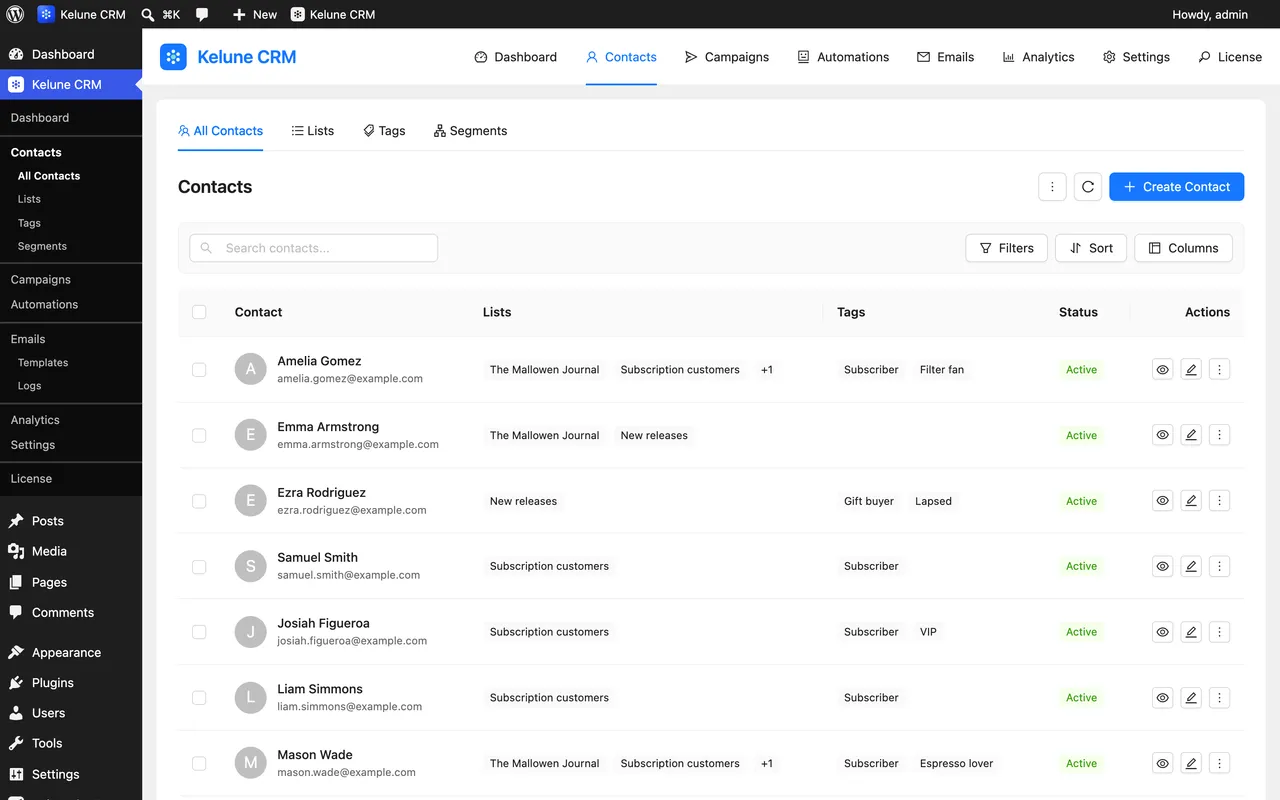
Everyone who touched your site, in one table.
Contacts carry tags, lists, custom fields, notes and a timeline. Import them, sync them from WordPress users, or let signups and comments add them for you.
- CSV and Excel import
- WordPress user, signup and comment opt-in
- Double opt-in and subscription status
Campaigns
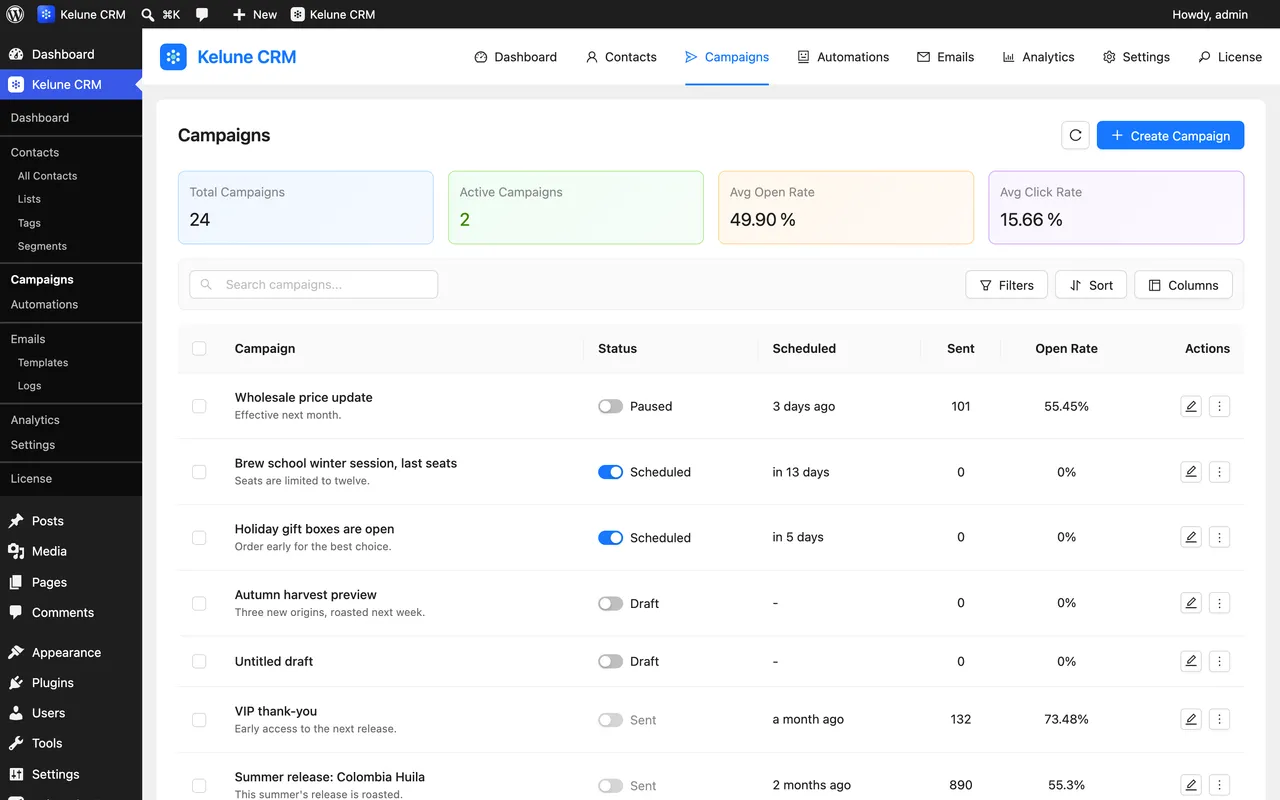
A queue that finishes the job, even on modest hosting.
Schedule a send and let batched delivery work through it. Pause and resume mid-send, and see opens, clicks and per-link results on the same screen.
- Audience from tags and lists, or a segment with Pro
- A/B tests with Pro
- A cron monitor that shows the queue is moving
Automation
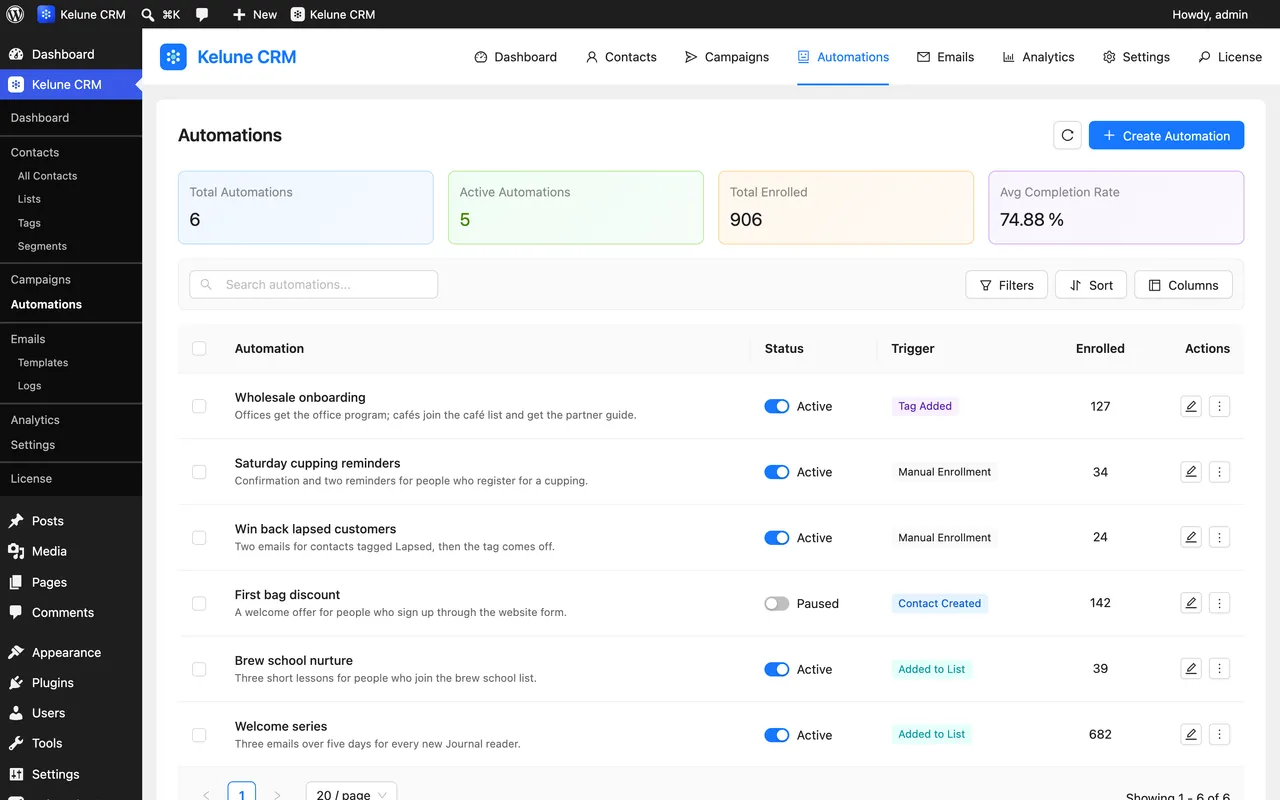
Follow-ups on a canvas, inside your admin.
Pick what starts it, how long to wait and what happens next. Five starter recipes to fork, and Pro adds conditions and engagement triggers.
- Seven free triggers and five recipes
- Conditional branches with Pro
- Edit while it runs
Free and Pro
The free plugin is the product. Pro is the sharp end.
Nothing in the free plugin expires, counts down or asks for a key. Pro adds the things people ask for once their list starts working for them, and needs an active license while it is installed.
Free
On WordPress.org- Unlimited contacts, tags, lists and custom fields
- Contact timelines, notes and activity history
- Drag-and-drop email builder with starter templates
- SMTP, Amazon SES, Mailgun and SendGrid
- Campaigns with scheduling, queue, pause and tracking
- Visual automation with seven triggers and five recipes
- Double opt-in, WordPress user sync and email logs
- Incoming webhooks, REST API, CSV and Excel import
- Roles and permissions for your whole team
Pro
Add-on- Dynamic segments that stay up to date
- Segment targeting and exclusion
- A/B testing with an automatic winner
- Conditional branching in automations
- Email opens and clicks as triggers
- Field update and webhook actions
- Smart links that tag and enroll on click
- Updates and priority support
Requirements
What it needs from your server.
Nothing exotic. If your site runs a current WordPress on PHP 8.1 or newer, it runs Kelune CRM. Sending volume is limited by your host and your email provider, not by the plugin.
- WordPress
- Works with the latest WordPress release, and supported all the way back to 6.6
- PHP
- PHP 8.1 or newer, for both plugins
- Cron
- WP-Cron, or a real system cron if you prefer. A monitor screen tells you which is working
- Sending
- The WordPress mailer, or credentials for SMTP, Amazon SES, Mailgun or SendGrid
- License
- GPLv2 or later — both plugins
Questions
The things people ask before installing.
Still unsure about something? Ask us directly — a person reads it.
Where is my contact data stored?
In your own WordPress database, in tables the plugin creates. Nothing leaves your server unless you set up an email provider and send something, or turn on Gravatar avatars. Pro also checks its license and updates with our license server, and sends nothing about your contacts.
Is there a contact limit?
No. The plugin does not count contacts or emails, and the price does not change as your list grows. Your host and your sending provider set the real limits.
Do I need Pro to use the plugin?
No. The free plugin is a complete CRM — contacts, custom fields, the email builder, campaigns, automation, webhooks and logs all work with no license key and nothing counting down. Pro adds dynamic segments, smart links, conditional automation with engagement triggers, advanced automation actions and campaign A/B testing.
What does it need to run?
WordPress 6.6 or newer and PHP 8.1 or newer. It works with the latest WordPress release. Both plugins are GPL-licensed.
How does it send email?
Through the WordPress mailer by default, or through SMTP, Amazon SES, Mailgun or SendGrid once you add credentials. Setting a provider also routes the rest of your site's WordPress email through it.
Will campaigns actually finish sending on cheap hosting?
Campaigns send in batches through a queue rather than one long request. WP-Cron drives it, a non-blocking loopback keeps it moving between visits, and a lock stops the same batch running twice. A settings screen shows you whether it is running.
Can I export everything and leave?
Yes. Contacts export to CSV, email logs export to CSV, and the data sits in your own database the whole time. Deleting the plugin never deletes your records — there is no uninstall routine that drops your tables.
Does Pro work on its own?
No, it is an add-on. Install the free plugin first; Pro attaches to it and adds its features to the same screens. Without the free plugin, Pro stays dormant and tells you what is missing.
What happens when a Pro license ends?
Campaigns, automations and smart links keep running, but while Pro is active the Kelune CRM dashboard needs an active license. Renew the license to unlock it, or deactivate Pro to keep using the free plugin with all of your data.
What can a segment actually filter on?
Names, email, phone, company, city, state, country, postal code, source, status, lead score, when the contact was created or updated, their tags and lists, any custom field, and whether they have activity in a recent window. Segments are a Pro feature; tags and lists cover the same job more simply in free.
Can I import from a spreadsheet?
Yes — CSV, .xlsx or .xls, with a column-mapping step so your headings do not have to match ours. A sample file ships with the plugin.
Install in two minutes
Add it to a site tonight. Move your list tomorrow.
The free plugin is the whole CRM — no key, no trial clock, no contact ceiling. Turn Pro on later if you need segments, A/B tests or conditional automations.
Free on WordPress.org · GPL licensed · Prefer hosted? Try Cloud free