Kelune CRM Cloud · hosted by us
Contacts in. Campaigns out.
Automation in between.
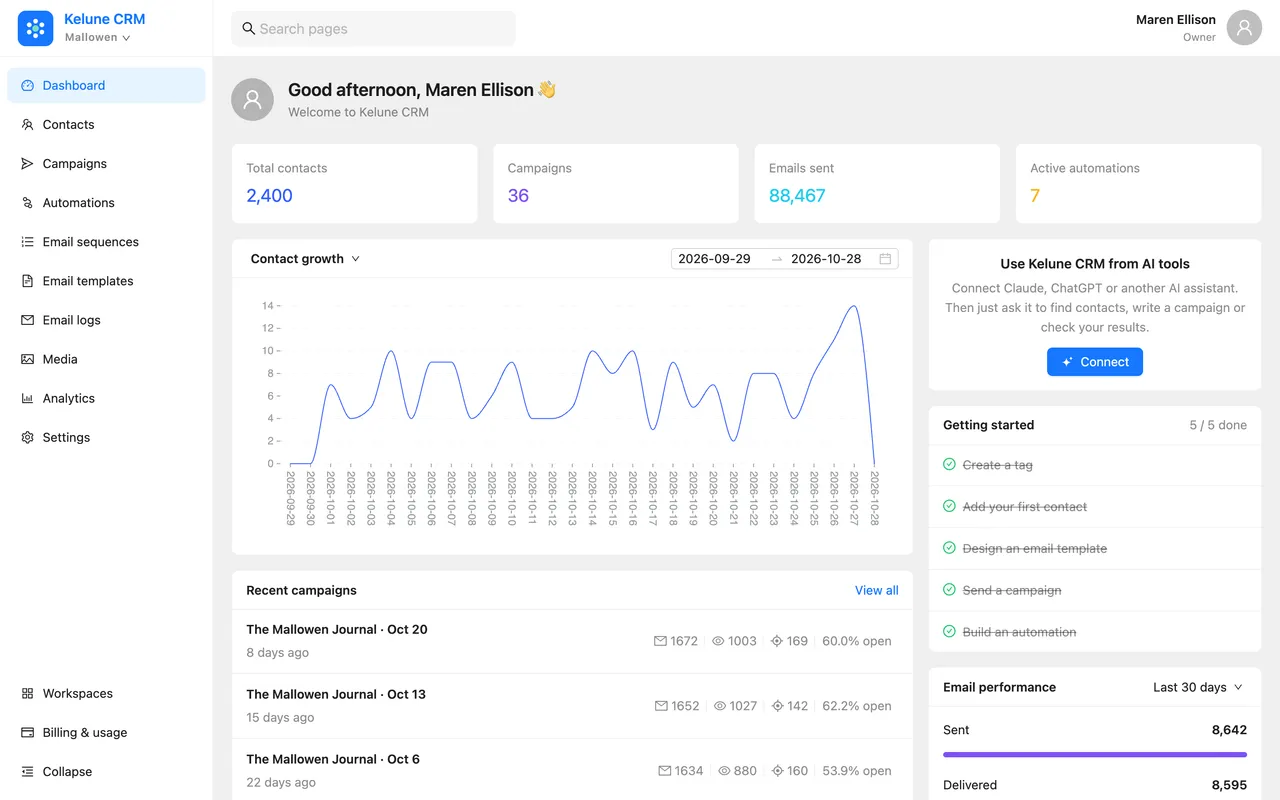
Kelune CRM Cloud is a hosted email marketing CRM: contacts, segments, campaigns and visual automation in one app. Every feature is on every plan, and your mail goes out through your own sending account.
- Every feature on every plan
- No card needed
- Your own sending provider
- Two-factor sign-in
Delivers through
- SMTP
- Amazon SES
- Mailgun
- SendGrid
What you get
Six things it does, all of them on the Free plan.
Contacts
Every person, one profile
Tags, lists, custom fields, notes, activity and an assignee on one screen. Import from CSV or Excel, export whenever you like.
Segments
Audiences that keep themselves current
Nested rules on fields, tags, lists and email activity. Segments refresh on a schedule and work as a campaign audience or an automation condition.
Campaigns
Send, test, follow up
Schedule a send, A/B test up to five variants, follow up with people who did not open, and turn an RSS feed into a recurring newsletter.
Automation
Journeys on a canvas
Triggers, conditions, delays, A/B splits and actions on a visual canvas. Start from a template, or use a sequence for a simple drip.
Delivery
Your sending account, not ours
SMTP, Amazon SES, Mailgun or SendGrid. Once bounce handling is set up, bounces and complaints from Amazon SES, Mailgun and SendGrid update the contact.
Connections
API, webhooks and AI tools
API keys, incoming webhooks and smart links, plus an AI tools connection that assistants such as Claude and ChatGPT can use.
Plus email templates and a media library, sequences, analytics and email logs, roles and permissions, an audit log, passkeys and two-factor sign-in. The full list is here.
Contacts
Every person, with everything you know about them.
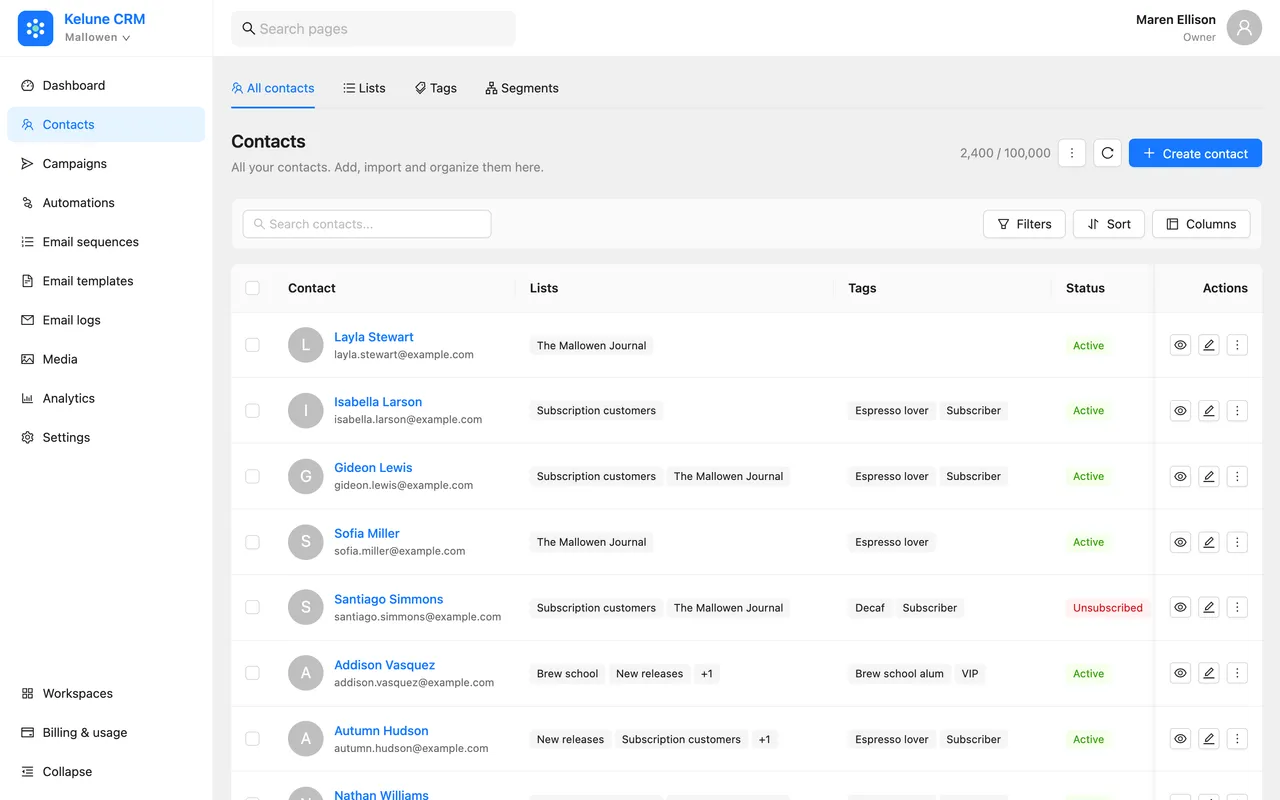
Tags, lists, custom fields, notes and an assignee on one record, with a timeline of every email they opened and link they clicked. Filter the table down to the people you mean, then act on all of them at once.
- Import CSV or Excel with column mapping
- Bulk tag, list, assign or export from the table
- Statuses kept honest by double opt-in and bounce handling
Segments
Describe the audience once. It keeps itself current.
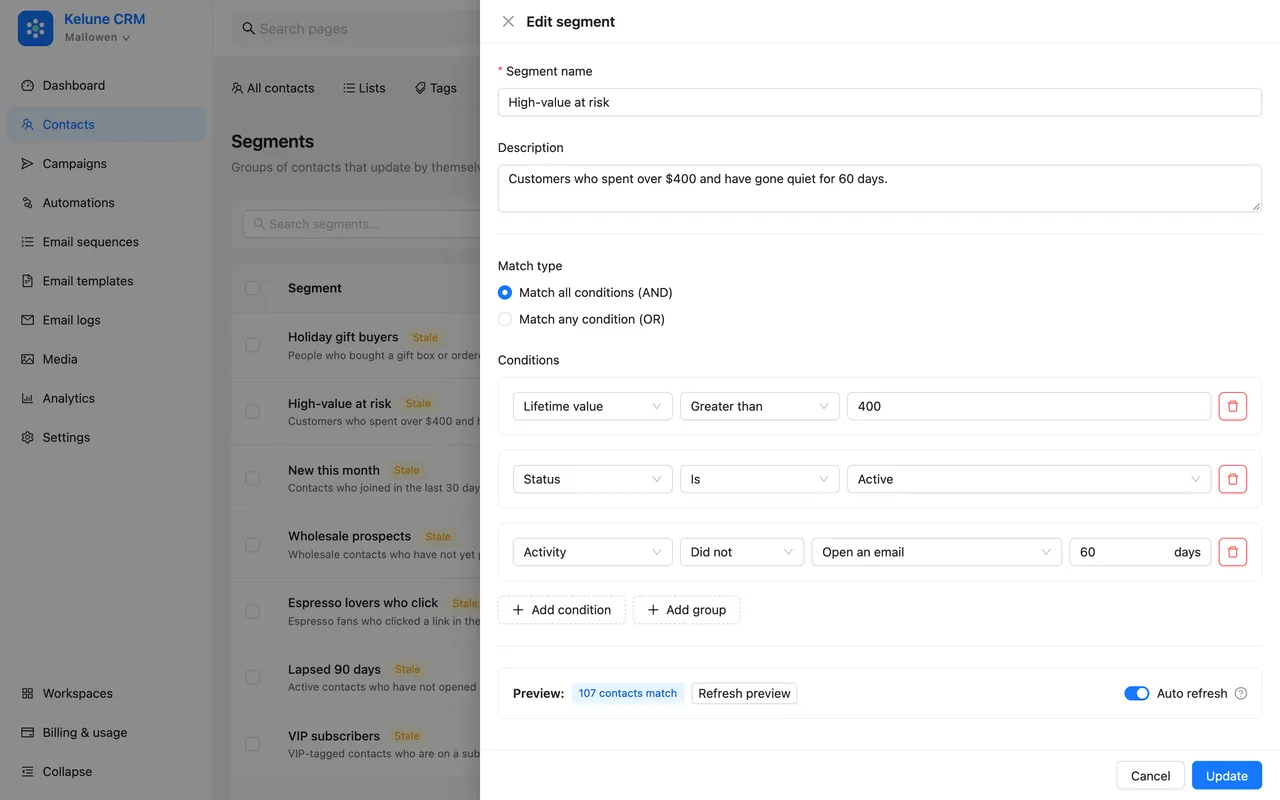
A segment is a saved set of rules: customers who spent over $400 and went quiet for 60 days, espresso fans who click. Contacts join and leave as their data changes, and campaigns and automations point straight at it.
- Rules on fields, tags, lists and email activity
- Match all or any, with nested groups
- Live count before you save
Email builder
Design it once. It looks right in every inbox.
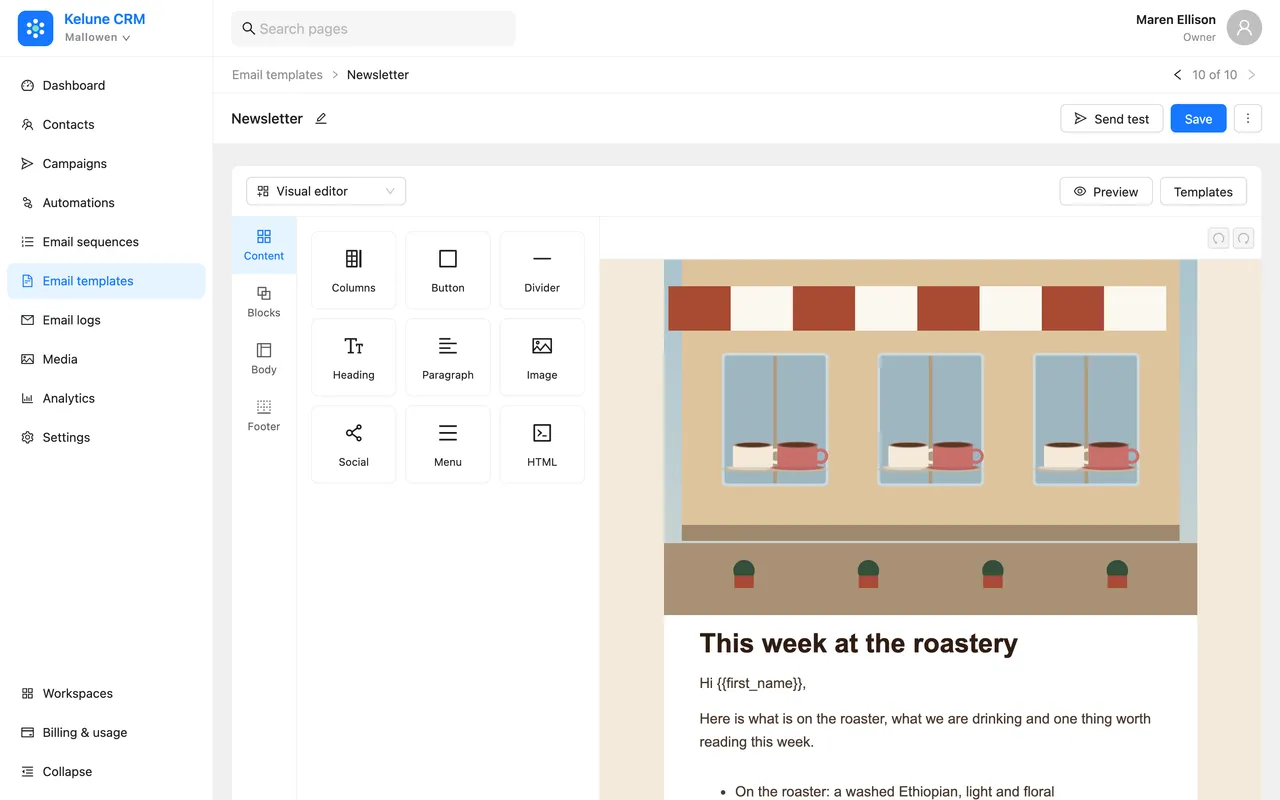
Drag headings, text, images, buttons, columns and social links into place, preview on desktop and mobile, then save it as a template for campaigns, sequences and automations.
- Merge tags for every contact field
- A media library with folders
- A rich text editor for plain, personal emails
Automation
Draw the journey. It runs on its own.
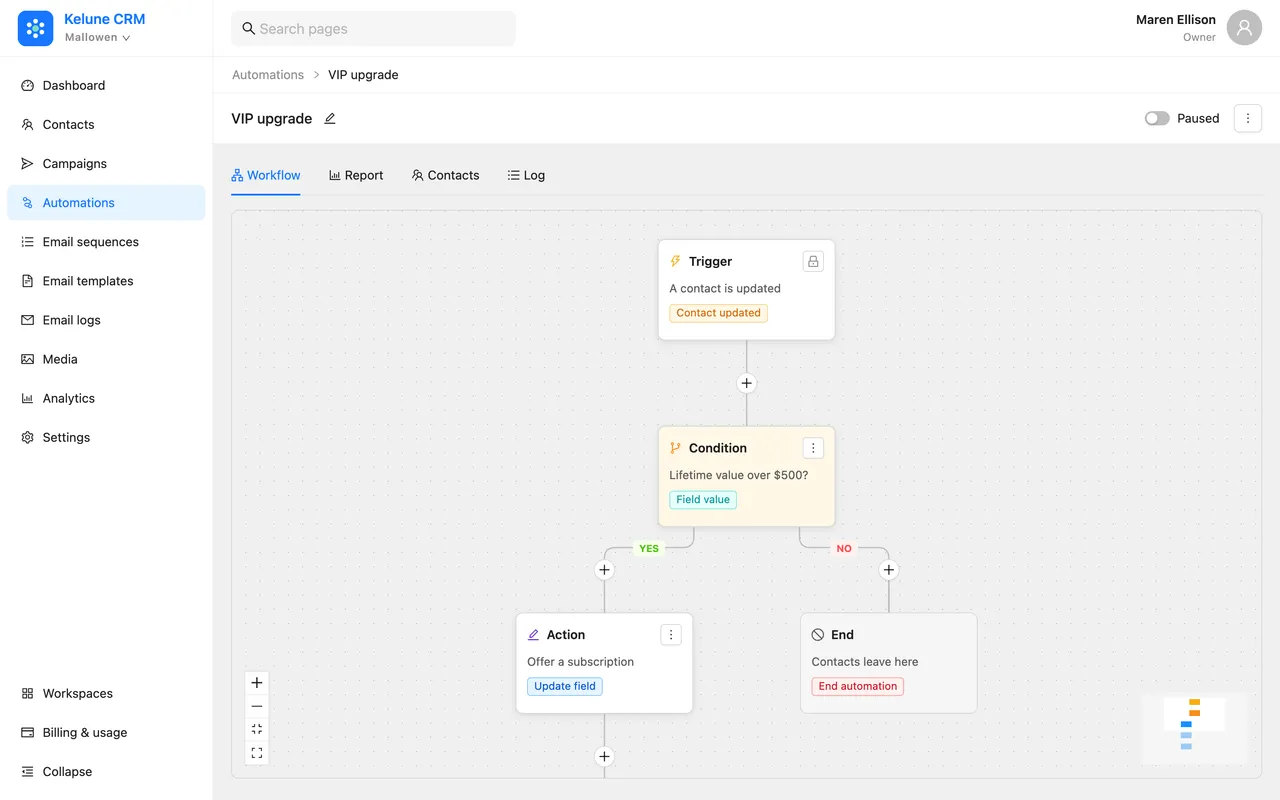
Pick what starts it, check who it is for, send the right email and wait before the next step. Every contact's path is logged, and each automation has its own report.
- Triggers on tags, lists, status, opens, clicks, webhooks and dates
- Conditions, A/B splits and wait-until steps
- Ready-made templates to start from
Reports
Know what worked, down to the link.
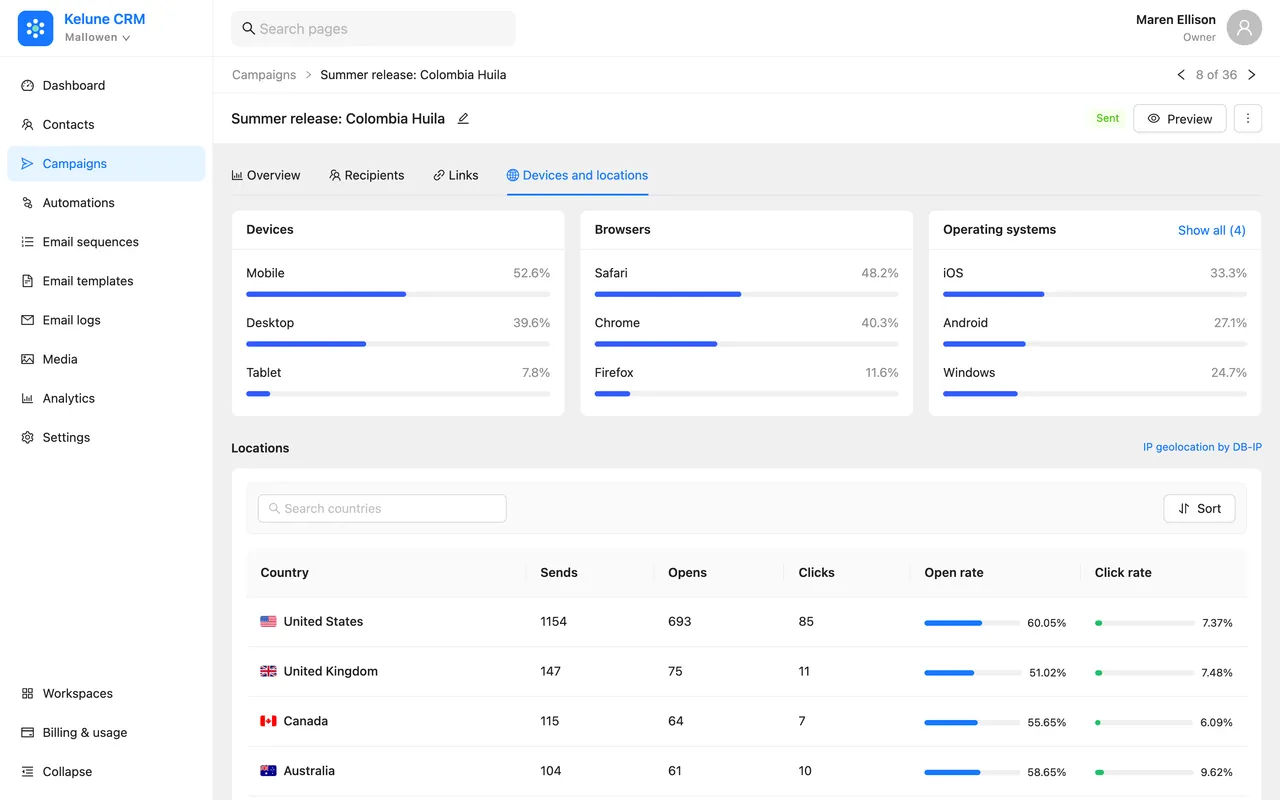
Every campaign has its own report: opens, clicks, the links people chose, the devices they read on and where they are. Scanner and bot opens are left out, so the numbers are people.
- Follow up with people who did not open or click
- Tag contacts by how they engaged
- Analytics and email logs across the whole workspace
Why Cloud
We run the CRM. You keep the list and the sender.
Kelune CRM Cloud is hosted and updated for you, so there is nothing to install or keep running. Mail still goes out through your own provider, on your own domain, so your reputation and your sending costs stay yours.
See everything it does- Pricing
- Every feature on every plan.Plans differ only in size: contacts, emails and team members. Start on Free with no card.
- Sending
- Your reputation, your provider.Connect SMTP, Amazon SES, Mailgun or SendGrid. Campaigns never leave from a shared sending pool.
- Team
- Built for more than one person.Invitations, built-in and custom roles, and an audit log of who changed what.
- Custody
- Your list, exportable.Export contacts to CSV or Excel whenever you like. Canceling moves you to Free; it never deletes your workspace.
Kelune CRM Self-hosted · hosted by you
Prefer to host it yourself?
Kelune CRM also comes self-hosted: a free edition you install on your own site, with Pro for segments, smart links and A/B tests. It is a separate product with its own license, and your contacts stay in your own database.
Questions
The things people ask before starting.
Still unsure about something? Ask us directly — a person reads it.
Do I need a card to start?
No. Sign up and you start on the Free plan with no card and no trial clock. Upgrade from the billing page when you outgrow it.
What is the difference between the plans?
Size, nothing else. Every feature is on every plan, including segments, A/B tests, sequences, automation and AI tools. The plans differ in how many contacts, emails, team members and other items a workspace can hold. Free covers 1,000 contacts and 5,000 emails a month.
How does my email get sent?
Through your own sending account. Connect SMTP, Amazon SES, Mailgun or SendGrid in your workspace settings, and campaigns go out from your domain under your own reputation. Bounces and complaints from Amazon SES, Mailgun and SendGrid flow back and update the contact automatically.
What happens when I reach a limit?
Kelune CRM warns you as you get close. At the limit, the action that would go over it is refused with a message and a link to upgrade. Nothing already in your workspace is deleted or changed.
Can my whole team work in it?
Yes. Invite members, give them a built-in or custom role, and see who changed what in the audit log. Members sign in with a password or a passkey, with two-factor authentication on top.
Can I connect an AI assistant?
Yes. Each workspace has an AI tools connection that assistants such as Claude, ChatGPT or Cursor can use to look up contacts, build segments, draft campaigns and read reports. The assistant works with the same permissions as the member who connected it.
Who handles billing and tax?
Lemon Squeezy is the merchant of record. It charges the card and handles VAT and sales tax for your country, and your invoices come from there.
Can I cancel any time?
Yes, from the billing page. Your plan keeps running until the end of the period you paid for, then the workspace moves to Free. You can export your contacts as a CSV or Excel file whenever you like.
Is there a self-hosted version?
Yes. Kelune CRM Self-hosted is free, with a Pro add-on, and runs as a plugin on your own WordPress site, keeping your data in your own database. It is a separate product with its own pricing.
Start in two minutes
Open a workspace today. Send your first campaign tomorrow.
The Free plan has every feature, sized for your first 1,000 contacts. Move up a plan when your list does.
No card needed · Prefer to host it yourself? See self-hosted